
To open the selector, go to the GeoIP databases page and select Buy now or Get started with GeoIP.
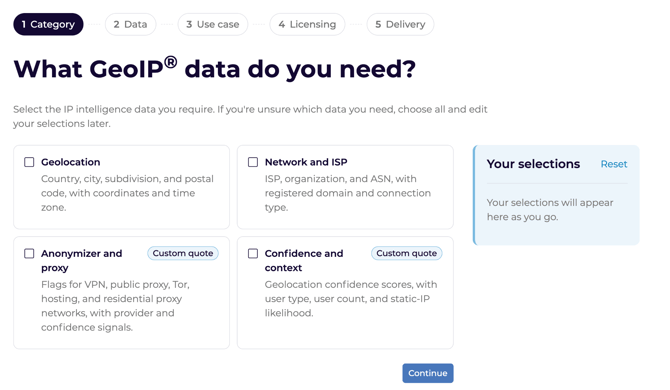
How to use the product selector
- Choose the categories of data you need. For example, geolocation and/or anonymizer and proxy, for example: country, city, or ISP.
- Choose the specific datasets you need. Based on the categories selected, select the specific dataset you need from each of the categories you selected. Each field has a description, an example response, and a link to the developer documentation. To view and edit your selections use the “your selections” box in blue on the left hand side. To remove a dataset from your selections, click the x. To add more data, click back to the “data” step and select from the list. If you’d like to add data from other categories, go back to the category step and select more categories.
- Select your use case, for example: compliance, fraud prevention, marketing, security, or networking.
- Answer the two questions. Tell us who sees the location information and whether you sell location features to other businesses. If you're unsure how to answer these questions, see How to answer the selector questions for more guidance.
- Review your recommendation. Based on your data needs and use case, the selector will display the best MaxMind data products for you and their prices, if available.
- Buy online or contact sales.
Choose your preferred delivery method from the available options and click “get my product” to add it to your cart.
For some data types and use cases you may be unable to purchase a database self-serve. This is due to licensing restrictions. In those cases, the selector will display the reason and prompt you to talk to our sales team to purchase that data product. If you click the “talk to sales” button it will display a form pre-populated with your selections from the selector, click submit to send your inquiry. Once you’ve submitted your inquiry, please wait for our sales team to respond to your request. We aim to respond to all requests within 24 hours, or on the next business day.
How to answer the selector questions
The two questions help the selector make a recommendation. They do not cover all license conditions. If you answer no to both, your use of a database is not automatically permitted. For more information, please see:
1. Will anyone outside your company see location information?
Answer yes if visitors, users, customers, or clients see IP geolocation data or a representation of it. For example:
-
- A city or country name on a website or in an app.
- A map that shows the location of a user.
- A login history that shows location names.
- A report or chart with IP geolocation data that you share outside your company.
If you use GeoIP data to customize your own content, that is different from showing the IP geolocation data itself.
2. Are you selling location features to other businesses?
Answer yes if you sell a product or service to another company and that product uses IP geolocation. For example:
-
- A fraud detection service for merchants that uses GeoIP data.
- Analytics for business clients that use GeoIP data.
- A platform or API that returns IP geolocation data to other businesses.
If you are not sure how to answer either of the questions above, contact sales at: enterprise@maxmind.com. Please include a (1) what data you needdetailed description of how you plan to use the data so that our team can review and advise.
Compare databases and web services
- Database: A downloadable file that you host and run locally.
- Web service: A cloud API that you query. You pay per credit.
For a full comparison of delivery, maintenance, data fields, and licenses, check out our Choose the right geolocation product article.
Questions about your recommendation or order
Why is the GeoIP database option unavailable?
The selector recommends products based on your selections. If the database option is unavailable and your use case needs a database, contact our sales team. We will review your intended use and discuss license options with you.
Why did the selector send me to sales?
Some products and use cases aren’t covered by the Online EULA and thus aren’t available for purchase self-serve. Tell our sales team how you plan to use the data and who sees or has access to it. We will help you find the product and license for your use case.
Where can I find pricing?
The selector shows the price with its recommendation, if available. Current self-serve prices are on the pricing page. For commercial license prices, contact sales.
What if I am not sure how to answer?
Read the examples in How to answer the selector questions. If no example matches your use case or you are still unsure, contact sales. Tell us how you use the data and who sees or has access to it.
Can I buy a database from my account portal?
Yes, if you bought that database before. Existing customers can buy updates or subscriptions for those databases in the account portal. To buy a new database, use the main website. For details, read our Purchase databases article.
Need more help?
- Product selection or commercial licenses: Email enterprise@maxmind.com.
- Orders, accounts, or technical problems: Submit a support request.
- Data fields and integration: Read the GeoIP developer documentation.